If your stream stutters at the same time every evening, ISP throttling is one of several possible causes, and there is no single switch that removes it entirely. Stop ISP throttling on UK IPTV panels by combining a few practical steps: checking your connection type, adjusting router settings, testing your service at different times, and asking your internet provider directly about traffic management on your line. None of these steps guarantee a perfect stream every time, because throttling is only one of several things that can cause buffering.
What ISP Throttling Actually Means
Internet providers manage traffic on their network to keep it running smoothly for everyone. Some providers slow down specific types of traffic during busy periods, particularly large or continuous data streams, which is how throttling gets its name. This is not unique to IPTV. Netflix, YouTube, and video calls can all be affected by the same traffic management practices depending on your provider and your contract.
It is worth being clear that throttling and buffering are not always the same thing. Buffering can come from your home Wi-Fi signal, your router’s age, the number of devices sharing your connection, or the server load on the IPTV panel itself. Before assuming your ISP is the cause, it helps to rule out the simpler explanations first.
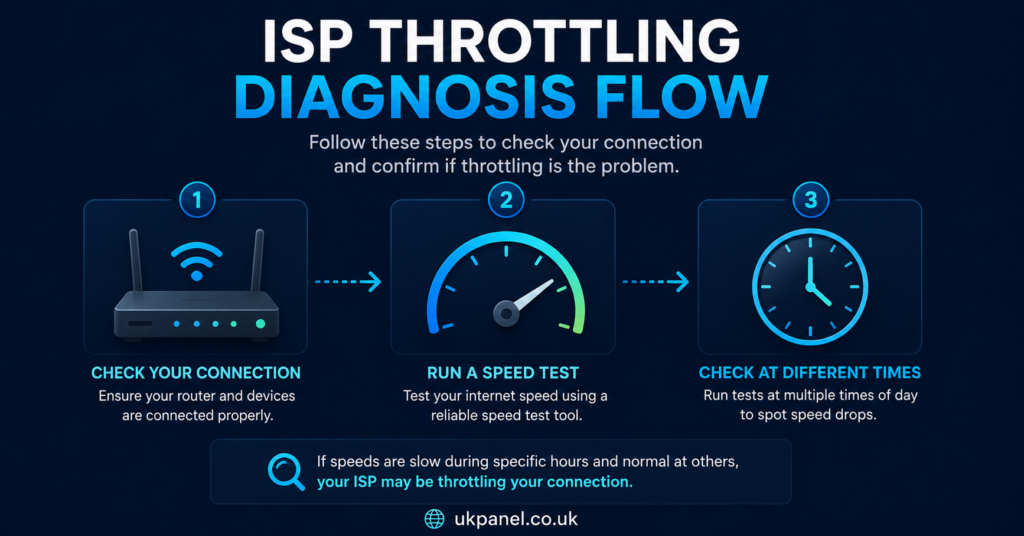
Pro tip: Run a wired speed test right before and during a buffering session. If speeds drop sharply only during streaming, that points more clearly toward traffic management than a general connection fault.
Common Signs That Point to Stop ISP Throttling on UK IPTV Panels as a Priority
Not every buffering issue needs the same fix. A few patterns are worth watching for over a few days before deciding throttling is the main issue:
- Buffering happens mostly in the evening, when local network congestion is highest
- Speed tests on non-streaming apps stay normal while video streams specifically slow down
- The problem appears across multiple devices on the same connection, not just one
- A wired connection shows the same drop as Wi-Fi, ruling out a weak signal
| Good sign | Warning sign |
|---|---|
| Speeds stay consistent across all apps | Only video traffic slows down |
| Wired and Wi-Fi perform the same | Only Wi-Fi devices struggle |
| Problem is occasional | Problem repeats at the same time daily |
Practical Steps for Subscribers
For subscribers using a UK IPTV panel, a few adjustments can meaningfully reduce buffering even where some traffic management is happening in the background.
Check your router and connection type first. A wired Ethernet connection to your streaming device is more stable than Wi-Fi, particularly in homes with several connected devices. Older routers may also apply their own quality-of-service rules that slow down certain traffic types without you realising it.
Test at different times of day. If buffering only happens during peak evening hours, that is more likely general network congestion, either on your local line or further up the ISP’s network, rather than something specific to the IPTV panel itself.
Contact your ISP directly. Providers are required to be transparent about traffic management under UK telecoms rules, and asking directly whether your package applies any shaping to video traffic is a reasonable first step. Some providers will confirm this on request; others will only say that management applies “during busy periods” without specifics.
Review your package tier. Lower-tier broadband packages are more likely to have bandwidth caps or prioritisation rules than higher-tier ones. If streaming quality matters to you, checking whether an upgrade is realistically available is worth doing before assuming nothing can be improved.
Pro tip: Keep a simple log of buffering times and speed test results for a week. Patterns are much easier to explain to your ISP, or to a support team, when you can show specific times and dates rather than a general complaint.
What Resellers Should Understand About Throttling Complaints
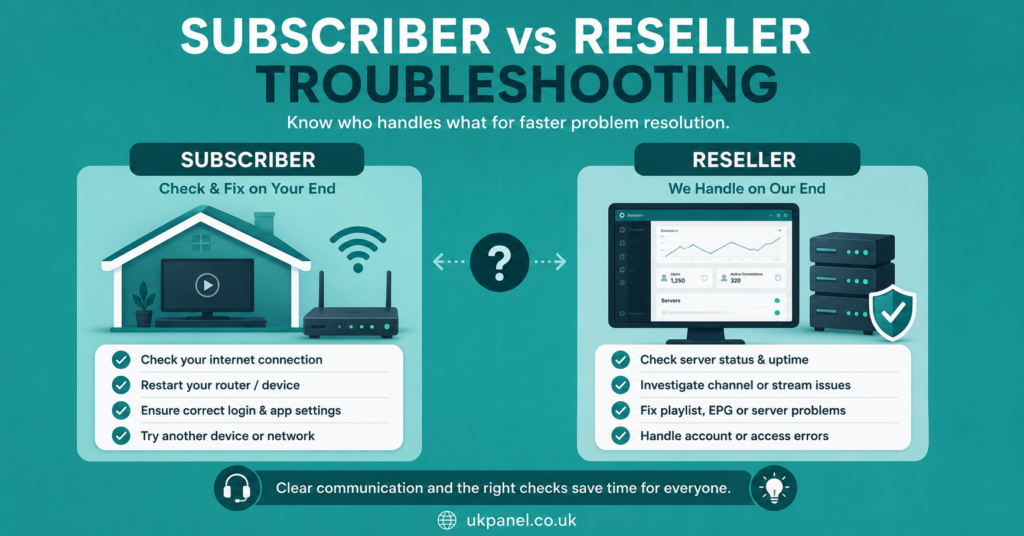
UK IPTV Panel Reseller and sub-reseller accounts, including those managed through platforms like britishseller.co.uk, often receive buffering complaints that get labelled as throttling without enough diagnosis. Since resellers do not control a customer’s home network or their ISP, the practical response is usually a short diagnostic checklist rather than a guaranteed fix.
A useful approach is separating what the reseller can influence from what they cannot:
| Reseller can influence | Reseller cannot influence |
|---|---|
| Server load, connection limits, EPG accuracy | Customer’s home Wi-Fi and router age |
| Support response time and clarity | The customer’s ISP traffic policies |
| Account and device limit transparency | Local network congestion at peak hours |
Pro tip: Build a short troubleshooting script for support staff that asks about connection type, time of day, and device before assuming the panel itself is at fault. This saves time for both sides and avoids unnecessary account changes.
Sub-Reseller Considerations
Sub-resellers usually depend on a parent reseller for technical escalation, which means throttling-related complaints need to be filtered carefully before being passed up the chain. A customer reporting “constant buffering” may simply need a router restart or a wired connection, and escalating every case adds unnecessary friction to the parent account relationship.
It also matters to be upfront with customers about what a sub-reseller account can and cannot resolve. Promising that a change on the panel side will remove ISP-level traffic management is not something a sub-reseller, or anyone else, can honestly guarantee.
When the Cause Is Not Your ISP at All
It is worth remembering that panel-side issues can look identical to throttling from a subscriber’s point of view. Server capacity during high-demand periods, EPG load, and the number of concurrent connections on a shared server can all cause similar symptoms. This is why a fair diagnosis looks at both ends of the connection rather than assuming the ISP is always responsible.
Pro tip: If buffering happens only on one particular channel or stream, and not others, that points toward a server-side or content-source issue rather than general ISP traffic management.
Setting Realistic Expectations
There is no method that removes all forms of network management, and providers are generally within their rights to manage traffic as part of normal network operation. The realistic goal is reducing the impact where possible, understanding what your provider is doing, and knowing when the cause sits elsewhere. For anyone comparing providers or looking at what a service can reasonably promise, the IPTV reseller panel overview is a useful starting point for understanding how panels are structured on the provider side.
Frequently Asked Questions
Does a VPN stop ISP throttling completely?
Not always. A VPN can sometimes reduce specific traffic-based throttling by changing how your traffic is classified, but it also adds its own overhead and depends heavily on the VPN provider’s speed and server load. It is not a guaranteed fix.
Is ISP throttling legal in the UK?
Traffic management is generally permitted under UK telecoms rules, provided the provider is transparent about it in their terms. Providers are expected to disclose their traffic management policies on request.
Why does my IPTV panel only buffer in the evening?
Evening buffering usually points to peak-time congestion, either on your local network or further along your ISP’s infrastructure, rather than a fault specific to the IPTV panel itself.
Can my reseller fix ISP throttling for me?
No. A reseller has no control over your home network or your ISP’s traffic policies. They can help rule out panel-side issues, but the connection itself sits outside their control.
Should I switch ISPs to fix buffering?
It can help if your current package has aggressive traffic management, but it is worth diagnosing the cause first, since switching providers will not resolve router, Wi-Fi, or server-side issues.