IPTV Connection Errors: What’s Actually Causing Them and How to Fix Them Fast
It starts with one WhatsApp message. Then three. Then your phone is ringing.
“The football isn’t loading.”
Every IPTV Panel reseller knows this moment. Not because the platform is down, but because something far more specific has broken, and you have about four minutes before your inbox becomes a support queue disaster. IPTV connection errors are not random. They are symptoms. And if you’ve been treating them like one-off glitches, you’re already losing subscribers to someone who treats them like engineering problems.
This guide isn’t written for people who sell a few panels on the side. It’s written for operators managing real load, real panels, and real consequences when streams drop during peak hours.
What’s Actually Causing Your IPTV Connection Errors (It’s Rarely What You Think)
Most IPTV resellers default to blaming the provider when connection errors appear. Sometimes that’s fair. More often, the failure originates somewhere between your panel configuration and your subscriber’s router, and that’s entirely within your control to influence.
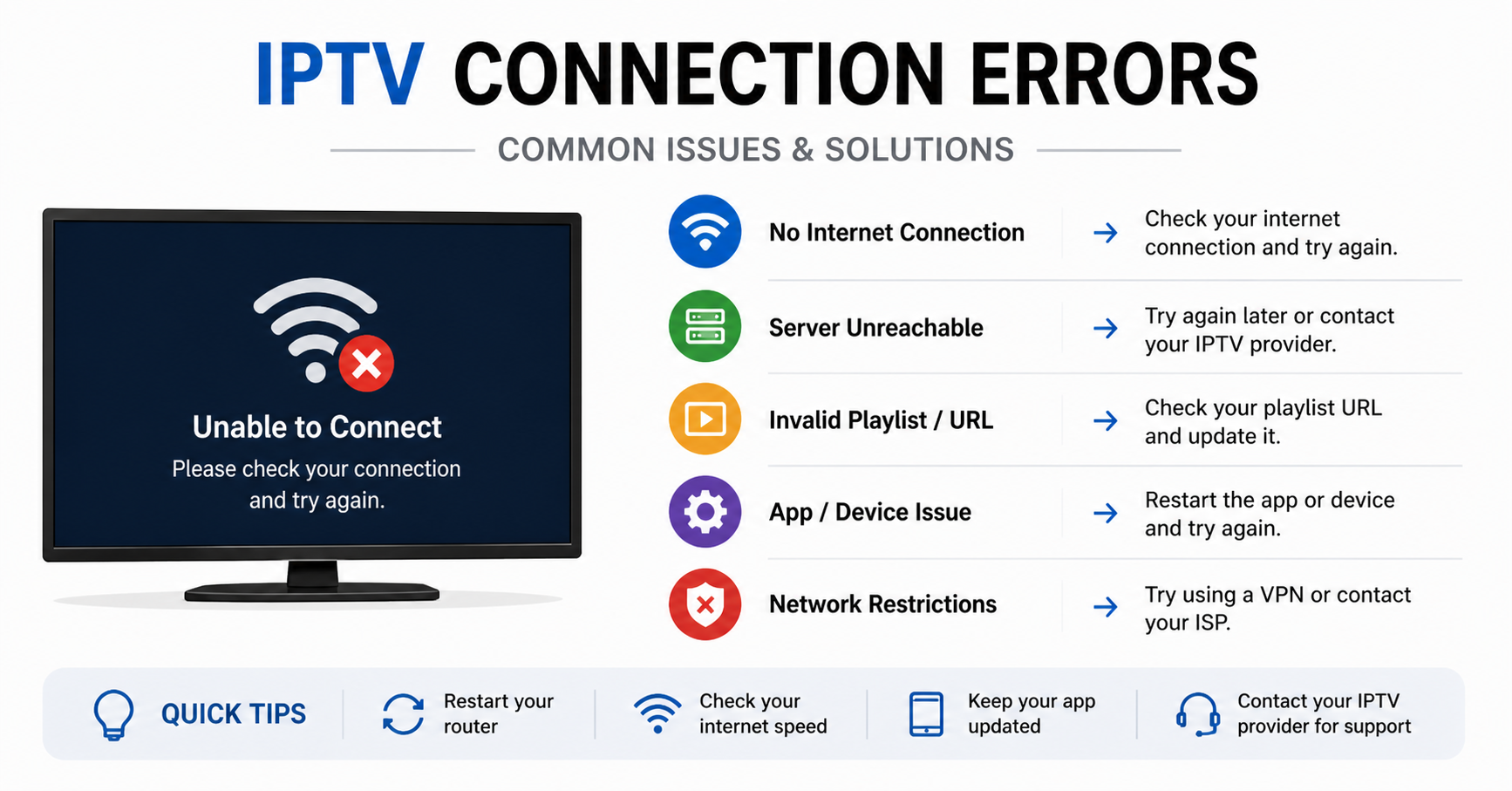
The four most common root cause categories:
- Authentication timeouts: the panel fails to re-validate the subscriber’s token mid-session
- DNS resolution failure: the stream URL resolves to a blocked or dead IP
- HLS latency spikes: buffer underruns caused by segment delivery delays
- Concurrent connection cap breaches: a single line being shared across too many devices
None of these show up on your provider’s dashboard as “connection error.” They show up as a black screen on your subscriber’s Firestick and a complaint in your DMs.
Pro Tip: Before blaming your upstream provider, run a parallel test stream on a completely separate DNS server, Google’s 8.8.8.8 or Cloudflare’s 1.1.1.1. If the issue clears, DNS poisoning is your culprit, not infrastructure failure.
How ISP-Level Blocking Creates IPTV Connection Errors in 2026
This is the part most reseller guides skip entirely, and it’s the part that matters most right now.
ISP enforcement has become increasingly algorithmic in 2026. Deep packet inspection alone isn’t the mechanism anymore. Major ISPs are now deploying AI-assisted traffic classification that flags stream patterns associated with IPTV delivery. The result is selective throttling that looks, to your subscriber, identical to a random connection error.
What makes this particularly difficult to diagnose:
- The subscriber can load YouTube at full speed
- Speed tests return normal results
- Only specific stream types, particularly premium sports, are affected
- The issue clears on a VPN, which confirms ISP-level interference
This isn’t a panel problem. This is enforcement infrastructure operating at the routing layer. Resellers who understand this distinction stop wasting time restarting streams and start advising subscribers on intelligent network routing instead.
Here’s how to match the symptom to the actual cause:
[TABLE 1 HERE]
Panel Configuration Mistakes That Manufacture IPTV Connection Errors
Here’s what watching resellers fail at scale looks like in practice: they buy credits, spin up lines, and push subscriptions without ever reviewing the panel settings that directly govern connection stability.
Three configuration errors that silently generate IPTV connection errors at scale:
- Maximum connections set too high per line. Allowing four or five simultaneous connections on a single line sounds generous. It also means one household can consume five streams, which during a major match collapses your available load capacity and produces connection errors for everyone else on the same server cluster.
- No output format restriction. Some panels allow subscribers to pull streams in multiple formats simultaneously. Without restricting to a single output, HLS for most devices, you create redundant server requests that inflate load and trigger rate limiting.
- Expired EPG source causing player crashes. This one gets misread constantly. When your EPG source URL expires or rotates, most IPTV players throw what appears to be a connection error. It isn’t. The stream is fine. The guide data is broken. Subscribers interpret a frozen programme guide as a connection failure and raise a ticket.
Pro Tip: Set a calendar reminder every 28 days to manually verify your EPG source URL. Many IPTV Panel resellers lose subscribers to “connection errors” that are actually stale guide data, a 30-second fix that most operators never schedule.
The Infrastructure Gap: Why Cheap Panels Bleed Subscribers During Peak Load
You cannot troubleshoot your way out of a structural infrastructure problem. If your upstream provider is running overloaded server clusters with no failover architecture, you will generate IPTV connection errors during exactly the moments subscribers care most, peak sports windows, primetime drama, live events.
This is the single biggest source of churn in the reseller market, and it’s almost never discussed honestly.
Here’s what you’re actually buying when you choose between budget and premium infrastructure:
| Factor | Budget Provider | Premium Provider |
|---|---|---|
| Uplink servers | Single uplink, no redundancy | Multiple uplinks, auto-failover |
| Load balancing | Manual or absent | Automated, real-time |
| HLS latency | 8 to 15 seconds | 2 to 5 seconds |
| DDoS mitigation | Basic or none | Active scrubbing |
| Connection error rate | High during peak | Minimal with proper config |
| Panel credits per stream | Cheaper upfront | Higher cost, lower churn |
The reseller who invests in premium infrastructure and charges accordingly retains subscribers. The one who competes purely on price spends every weekend firefighting IPTV connection errors while their customers quietly cancel.
Backup Uplink Servers: The Reseller Insurance Policy Most People Skip
If your provider offers a backup server URL and you haven’t distributed it to your subscribers, you are one targeted enforcement action away from a catastrophic churn event.
Backup uplink servers exist precisely because the primary server is always the first target, whether from ISP-level blocking, DDoS attack, or maintenance downtime. When the primary goes down and you have no backup URL in place, every subscriber experiences what they call an IPTV connection error. What they actually experience is a provider outage you had no contingency for.
The practical implementation is straightforward:
- Maintain a secondary M3U or Xtream URL for every active subscriber
- Document the backup URL in your onboarding message (not just support, onboarding)
- Test the backup server independently every two weeks
- When primary goes down, send your backup URL proactively. Don’t wait for tickets.
Pro Tip: Create a WhatsApp broadcast list segmented by provider. The moment you detect a primary server issue, broadcast the backup URL before the first complaint arrives. This single habit will cut your support volume in half during outages.
Device-Side IPTV Connection Errors: What’s Happening on the Subscriber’s End
Not every IPTV connection error originates at the infrastructure level. A significant portion trace directly to the subscriber’s device, and diagnosing these remotely is one of the more underrated skills in reseller support.
The most common device-side failure patterns:
- Firestick/Android TV: cached app data causes authentication loops that register as connection errors. A force-stop and cache clear resolves this in under two minutes, but subscribers who don’t know this will raise a ticket, wait for a response, and potentially cancel while waiting.
- Smart TV built-in apps: most built-in IPTV players have no background refresh mechanism. When an M3U playlist URL updates at the provider level, the player continues pointing to a dead endpoint. The subscriber sees a connection error. The fix is re-entering the updated URL, nothing else.
- Router DNS cache: this affects entire households simultaneously, which makes it look like a server problem. All devices lose streams at once. A router restart flushes the cache and resolves DNS-based IPTV connection errors instantly.
Build a one-page troubleshooting guide covering these three scenarios and send it to every new subscriber at activation. Support tickets drop significantly.
Reseller Psychology: How IPTV Connection Errors Destroy Renewals
Subscribers don’t leave because of IPTV connection errors. They leave because of how those errors were handled. A dropped stream during a live match is recoverable. A dropped stream during a live match with no response from the reseller for two hours is a cancellation.
The operators who retain subscribers through infrastructure problems share three behaviours:
- They communicate before being asked. When a server issue is detected, they message first.
- They explain, briefly. “Server maintenance, back in 20 minutes” outperforms silence by every measurable metric.
- They offer something. An extra day on the subscription, a bonus credit, anything that signals accountability.
Churn from IPTV connection errors is recoverable. Churn from being ignored is permanent.
Frequently Asked Questions
What causes IPTV connection errors on Firestick specifically?
On Firestick, IPTV connection errors most commonly result from accumulated app cache, an outdated M3U playlist URL, or DNS conflicts caused by the router’s DNS settings. Force-stop the IPTV app, clear its cache, and re-enter your stream URL. If issues persist, switch your Firestick’s DNS manually to 1.1.1.1 or 8.8.8.8 in the network settings.
Why do IPTV connection errors only happen during live sports?
Peak concurrent usage during live events overloads server clusters that aren’t built with proper load balancing. If your provider lacks redundant uplinks, connection errors spike exactly when demand does. This is an infrastructure problem, not a coincidence. Upgrading to a provider with active load balancing resolves this pattern.
Can IPTV connection errors be caused by my internet provider?
Yes. ISPs increasingly use AI-assisted traffic classification to throttle or block IPTV streams. If your streams work normally on a VPN but fail without one, ISP-level filtering is the cause. Advise affected subscribers to use a VPN on their streaming device or router level.
How do I know if IPTV connection errors are from my panel or the provider’s server?
Test using a completely separate device on a different network with a fresh line. If the error persists across different networks and devices, the issue is upstream, provider-side. If it only occurs on specific devices or networks, the problem is local configuration or ISP interference.
Is it normal to get IPTV connection errors after a provider update?
Yes, and this is frequently misdiagnosed. Providers rotate server URLs, update authentication endpoints, or change stream formats during maintenance. Your player may be pointing to a deprecated URL. Always request a fresh M3U or Xtream URL from your panel after any confirmed provider-side update.
What’s the fastest way to fix IPTV connection errors for multiple subscribers at once?
Distribute the backup server URL immediately via a broadcast message on WhatsApp or Telegram. If the issue is DNS-based, send instructions for switching to Cloudflare or Google DNS. Proactive, group communication is always faster than handling individual tickets and prevents churn during extended outages.
As a reseller, how many backup server URLs should I maintain?
Maintain at least two backup URLs per provider, one standard and one alternative format (e.g., HLS and RTMP). Test both independently on a weekly basis. During an active primary server failure, having a working backup you’ve already verified means zero downtime for your subscriber base rather than a full outage.
Can too many connections on one line cause IPTV connection errors?
Absolutely. When a subscriber or reseller runs multiple devices simultaneously beyond the line’s connection limit, the panel drops the excess connections as errors. Set your maximum connections per line to match the subscriber’s actual household size. Overselling connection capacity is one of the most common causes of reported IPTV connection errors that aren’t actually provider faults.
The Reseller’s IPTV Connection Error Response Checklist
Stop guessing. Work this list in order.
- Confirm the scope: is this one subscriber or multiple? Individual means device/line issue. Multiple means upstream or DNS.
- Test a fresh line on a separate network before contacting your provider
- Check DNS: switch to 1.1.1.1 and retest within two minutes
- Verify concurrent connections: confirm no line is being shared beyond its limit
- Check EPG source URL: confirm it hasn’t expired or rotated
- Test backup server URL independently before distributing it
- Communicate proactively: message your subscriber base before tickets accumulate
- Log the incident: timestamp, cause, resolution. Build your own fault history.
- Review panel output format settings: restrict to HLS where possible
- Audit your infrastructure tier. If IPTV connection errors spike every weekend, it’s a provider problem, not a configuration problem.
For operators serious about reducing IPTV connection errors at the infrastructure level before they reach subscribers, britishseller.co.uk covers panel selection, uplink reliability benchmarks, and reseller-grade diagnostic resources worth keeping bookmarked.