
If you’re trying to work out the Best VPN Protocols for IPTV, the short answer is that WireGuard usually gives the best balance of speed and security for streaming, while OpenVPN remains the safer choice when stability matters more than raw speed. IKEv2 sits somewhere in between and works well on mobile devices that switch networks often. There isn’t a single protocol that’s right for everyone, because the “best” one depends on your router, your device, and how much you value speed versus encryption strength. This guide breaks down what each protocol actually does so you can pick the right one for your setup.
What Does a VPN Protocol Actually Do for IPTV?
A VPN protocol is the underlying method your VPN app uses to build an encrypted tunnel between your device and the VPN server. It’s not the VPN service itself, it’s the engine running underneath it. Different protocols handle encryption, connection speed, and stability in different ways, and for IPTV specifically, this matters more than for general browsing because streaming needs a consistent, low-latency connection rather than just a secure one.
Choosing the wrong protocol won’t necessarily break your stream, but it can introduce buffering, longer load times, or dropped connections during peak hours. Understanding the trade-offs helps you set expectations correctly rather than assuming a service is faulty when the protocol is simply mismatched to your situation.
Pro tip: If your IPTV app buffers only during evening hours, try switching protocols before assuming the issue is your provider’s server capacity. Network congestion on your own ISP can behave differently depending on which protocol you’re using.
WireGuard: The Modern Choice for Streaming Speed
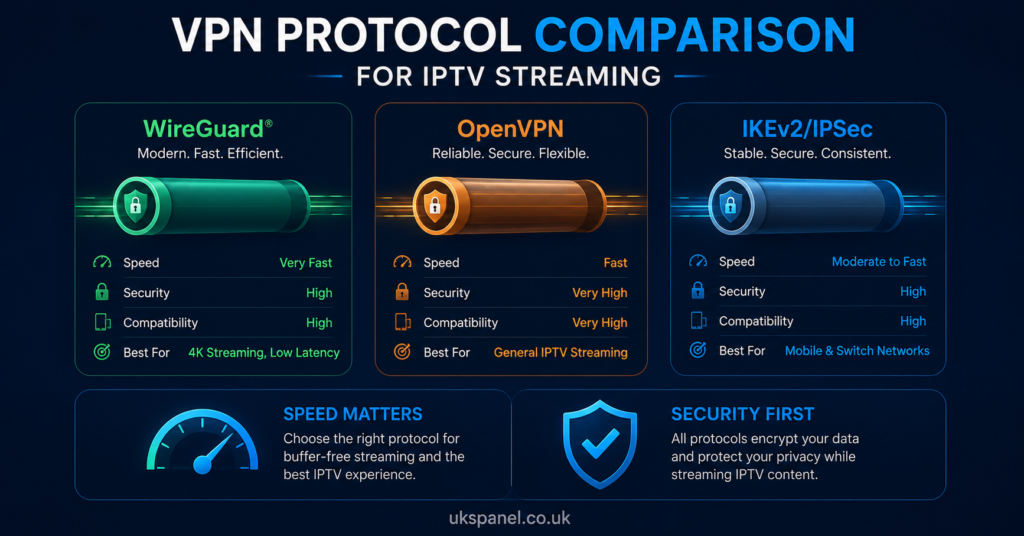
WireGuard is a newer protocol built with a much smaller codebase than older alternatives, which generally translates into faster connection times and lower overhead. For IPTV, this often means quicker channel switching and fewer moments of buffering when a stream first loads. Many VPN providers have adopted WireGuard as their default protocol because it performs consistently well across both mobile and fixed connections.
The trade-off is that WireGuard is still relatively young compared to OpenVPN, so some enterprise and legacy systems haven’t fully adopted it yet. For most home streaming setups, including Firestick, Android TV boxes, and smart TVs, this isn’t a practical concern.
OpenVPN: The Established Standard for Reliability
OpenVPN has been around for over two decades and remains one of the most thoroughly tested protocols available. It supports both UDP and TCP transport, which matters for streaming because UDP is generally faster and better suited to real-time video, while TCP is more reliable on unstable networks at the cost of some speed.
For subscribers on UK broadband connections with reasonably stable internet, OpenVPN over UDP tends to handle 4K streaming acceptably, though it’s rarely as fast as WireGuard on the same connection. Its main strength is its track record and the sheer number of devices and routers that support it natively.
IKEv2/IPSec: Best for Mobile and Switching Networks
IKEv2, usually paired with IPSec for encryption, is particularly good at reconnecting quickly when a device switches between Wi-Fi and mobile data. If you regularly watch IPTV on a phone or tablet while moving between networks, this protocol tends to hold the connection more gracefully than OpenVPN does.
It’s less commonly supported on set-top boxes and older smart TVs, so its usefulness for IPTV depends heavily on which device you’re actually streaming from.
Comparing the Main VPN Protocols
| Protocol | Best For | Limitation |
|---|---|---|
| WireGuard | Speed, 4K streaming, modern devices | Less support on legacy hardware |
| OpenVPN | Stability, wide device compatibility | Generally slower than WireGuard |
| IKEv2/IPSec | Mobile devices, network switching | Limited support on older TVs and boxes |
Does VPN Protocol Choice Affect Buffering?
Buffering during IPTV playback usually comes from one of a few sources: your own internet speed, congestion on the provider’s server infrastructure, or overhead added by the VPN tunnel itself. The protocol only controls the third factor, so switching protocols won’t fix an underlying bandwidth problem, but it can reduce the encryption overhead that eats into your available speed.
As a general rule, lighter protocols like WireGuard leave more bandwidth available for the actual video stream, which matters most when you’re pushing 4K content that typically needs a stable connection well above standard HD requirements.
Subscriber Guidance: Choosing a Protocol for Your Setup
For most subscribers, the practical approach is to try WireGuard first if your VPN app offers it, since it generally gives the smoothest experience for live channels and on-demand content. If you notice frequent disconnects rather than buffering, switching to OpenVPN can sometimes provide a steadier, if slightly slower, connection.
Device compatibility matters here too. Some IPTV apps run better with the VPN configured at the router level rather than on the streaming device itself, particularly on Firestick and older Android boxes where processing power is limited. IPTV Reseller Panel Providers such as britishseller.co.uk are one example of a service where device-specific setup guidance can help you match the right protocol to your hardware, though the same evaluation questions apply to any provider you’re considering.
Pro tip: Test a protocol change during your peak viewing hours, not late at night when networks are quiet. That’s the only way to see whether it actually solves a buffering issue you experience regularly.
Reseller Guidance: Supporting Customers Through Protocol Questions
If you run an IPTV reseller business, protocol questions are one of the more common support tickets you’ll receive, especially from customers who’ve read conflicting advice online. Having a short, clear explanation ready, similar to the comparison above, reduces back-and-forth and builds trust with less technical customers.
It also helps to document which protocols work best with the apps and devices you commonly see among your customer base, since this varies more than people expect. A reseller dashboard that lets you track recurring support issues can help you spot patterns, such as a particular firmware version on a smart TV brand consistently struggling with one protocol over another. For a broader look at how panel management and customer support fit together, see how an IPTV reseller panel works.
Common Mistakes People Make With VPN Protocols and IPTV
| Mistake | Better Approach |
|---|---|
| Assuming all protocols perform equally | Test WireGuard and OpenVPN separately on your setup |
| Blaming the IPTV provider for all buffering | Rule out protocol overhead and ISP congestion first |
| Using the same protocol on every device | Match the protocol to each device’s capability |
Setting Up Your Device Correctly
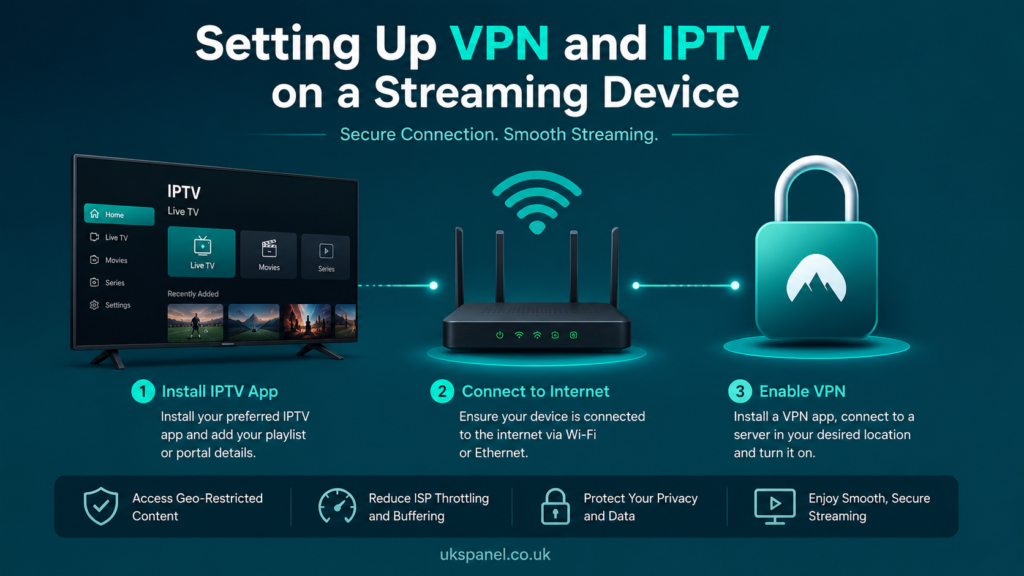
Whichever protocol you choose, getting the setup right on your specific device matters just as much as the protocol itself. A misconfigured app can cause the same symptoms as a poor protocol choice, so it’s worth ruling out basic setup errors before switching protocols repeatedly. If you’re setting up a new device for the first time, working through a proper installation guide before troubleshooting protocols will save time and rule out simpler causes.
A Word on Legality and Legitimate Access
It’s worth being clear that a VPN protocol changes how your connection is encrypted and routed, not whether the underlying content you’re accessing is properly licensed. IPTV is a delivery technology, and legality depends entirely on the content rights and distribution permissions held by whoever is providing the service. Choosing a fast, secure VPN protocol doesn’t change that equation, so it’s still worth checking a provider’s transparency, business registration, and terms before subscribing.
Frequently Asked Questions
Which VPN protocol is fastest for IPTV streaming?
WireGuard is generally the fastest of the widely available protocols due to its lightweight design, though actual speed still depends on your internet connection and the VPN server’s location.
Is OpenVPN too slow for 4K IPTV?
Not necessarily. OpenVPN over UDP can handle 4K streaming reasonably well on a solid connection, though it typically has more overhead than WireGuard.
Do I need a VPN at all to watch IPTV?
Some providers include VPN protection as part of the subscription, while others expect you to use a separate VPN app. This varies by provider, so it’s worth checking what’s included before assuming you need to buy one separately.
Can the wrong VPN protocol cause buffering?
It can contribute to it. A protocol with heavier encryption overhead leaves less bandwidth for the video stream itself, which can make buffering more likely on slower connections.
Does IKEv2 work on Firestick and Android TV boxes?
Support varies by app. IKEv2 is more commonly found on mobile operating systems, so check your specific IPTV app or VPN app’s supported protocol list before relying on it.
Should resellers recommend a specific protocol to customers?
It’s reasonable to suggest WireGuard as a starting point for most customers, but the right answer depends on each customer’s device and network, so a one-size-fits-all recommendation isn’t always accurate.
Conclusion
There’s no universal winner when it comes to the Best VPN Protocols for IPTV streaming, but WireGuard is the strongest starting point for most people chasing smooth 4K playback, with OpenVPN as a reliable fallback and IKEv2 suited to mobile users who switch networks often. The right choice ultimately depends on your device, your connection, and how the two interact in practice. If buffering persists after testing different protocols, it’s worth looking at your broader setup, from router configuration to the provider’s own infrastructure, rather than assuming one factor is solely responsible.
Setup Checklist
- Confirm which protocols your VPN app and IPTV app both support
- Test WireGuard first for speed-sensitive 4K streaming
- Switch to OpenVPN if you experience frequent disconnects rather than slow buffering
- Configure the VPN at router level if your streaming device has limited processing power
- Test any protocol change during peak viewing hours to see a realistic result
- Rule out basic app configuration errors before blaming the protocol itself