The Saturday a championship match froze across every screen in a packed venue, the manager didn’t lose a stream. He lost the room. Forty people who’d ordered a second round walked out mid-second-half, and the bar’s reputation took a hit that no refund fixed. That single outage cost more than a year of whatever they’d saved by running cheap infrastructure.
That’s the thing about Sports Bar IPTV nobody tells you upfront: the technology is the easy part. The hard part is that your busiest, highest-revenue moment is exactly when the system is most likely to break.
The short version. If you run Sports Bar IPTV, your two real enemies are peak-traffic congestion during big matches and the legal exposure of showing commercial sport on a consumer-grade service. The fix isn’t a fancier box — it’s a service built for redundancy plus a clear-eyed understanding of what you’re actually licensed to broadcast. Get those two right and the buffering, the blank screens, and the awkward conversations with rights holders mostly disappear.
Let me walk through what I’ve actually seen in venues, not the brochure version.
Why match night is the moment everything falls apart
Here’s a pattern I’ve watched repeat for years: a venue tests its Sports Bar IPTV setup on a quiet Tuesday, everything looks crisp, they sign off. Then the first major fixture lands and the picture stutters every ninety seconds.
The reason is concentration. On a normal evening, a provider’s load is spread thin across time zones and idle subscribers. During a marquee match, tens of thousands of streams hit the same source feed in the same ten-minute window. If that provider runs a single uplink with no load balancing, the pipe saturates and everyone downstream — including your eleven screens — gets the stutter.
Pro Tip: Test your service during an actual live match of a popular league, not on demand or on a quiet night. On-demand content is cached and lies to you about real-time capacity. The only honest stress test is concurrent live load.
A mistake we see repeatedly: operators blame their own Wi-Fi when the bottleneck is upstream. Before you rewire the building, run a wired speed test mid-match. If your local connection is fine but the stream still chokes, the problem lives with the provider’s infrastructure, not yours.
The licensing question most venues quietly ignore
This is the part that gets glossed over, so I’ll be direct. Showing live sport in a commercial venue is legally different from watching at home. In the UK, Ireland, the US, Australia and most English-speaking markets, public broadcast of sport requires a commercial agreement — typically through official commercial providers tied to the rights holders.
Many consumer IPTV services are sold cheaply precisely because they don’t carry those commercial rights. Running one in a licensed venue can expose the operator to action from rights organisations, not just a lost stream. I’m not your lawyer, and enforcement varies by country and league, but the financial risk of getting this wrong dwarfs any monthly saving.
| Consumer-grade service | Commercial venue setup |
|---|---|
| No commercial broadcast rights | Licensed for public showing |
| Single source feed | Multiple redundant sources |
| Buffers under peak load | Built for concurrent demand |
| No accountability if it vanishes | Contracted service + support |
| Cheap monthly cost | Higher cost, lower legal risk |
The honest takeaway: if a Sports Bar IPTV deal looks too cheap to be true for a commercial setting, the missing ingredient is usually the licensing — and that’s the expensive part to be missing.
What actually keeps screens stable
After helping venues troubleshoot more match-night failures than I can count, the stable ones share a short list of traits. None of them are exotic.
- A wired backbone. Every screen on Ethernet, never Wi-Fi for primary playback. Wireless is fine for a phone; it’s a liability across eight live feeds.
- A backup feed source. When the main source degrades, a second path takes over. The venues that never go dark are the ones with somewhere to fail over to.
- A dedicated line. Sports streaming shouldn’t share bandwidth with the card payment system and the guest Wi-Fi. Segment it.
- A pre-match ritual. Screens on and confirmed thirty minutes before kickoff, every time. The failures I’ve seen almost always surface in those thirty minutes — and almost never get caught when nobody checks.
Pro Tip: Keep a single fallback screen on a completely separate connection and service — even a basic one. When the main system has a bad night, one working screen showing the score buys you the goodwill to keep the room.
How resellers fit into the sports bar market
There’s a business angle here worth understanding, because a lot of venue setups are supplied not by a faceless platform but by an UK IPTV reseller who manages the account locally.
A good reseller is genuinely useful to a sports bar: they handle the panel, allocate credits, sort out renewals, and — critically — answer the phone when a feed drops twenty minutes before a derby. After reviewing hundreds of support requests, the single biggest predictor of whether a venue stays with a provider isn’t picture quality. It’s whether someone responds during the emergency.
For the reseller side of this market, sports venues are a different animal from home subscribers. A few things experienced panel owners know:
- Commercial clients churn hard on reliability, not price. One frozen final and you’ve lost the account. A home subscriber forgives a glitch; an IPTV business owner serving a packed bar does not.
- Sports-event spikes are your real test. A sub-reseller who only ever sold to households gets caught out the first time a client needs flawless delivery during a Champions League night.
- Credit allocation needs headroom for venues. Commercial accounts watch more, longer, on more screens. Plan panel credits accordingly.
Pro Tip: If you’re an IPTV operator targeting venues, build your support hours around fixture calendars, not office hours. The reseller who’s reachable at 8pm on a Saturday wins the commercial accounts that the nine-to-five panel owner can’t keep.
One reseller I know lost three bar accounts in a single season — not to a cheaper rival, but because his failover plan existed only on paper. When the source went down during a big weekend, there was no second path, and the venues moved on. Redundancy isn’t a luxury in this niche; it’s the entire value proposition.
The infrastructure terms worth understanding in plain English
You don’t need to be an engineer, but knowing a few concepts helps you ask providers the right questions.
Load balancing spreads viewers across multiple servers so no single one collapses under a big match. Failover is the automatic switch to a backup source when the primary fails — the difference between a two-second blip and a dead screen. DNS routing is how your system finds the feed; when ISPs interfere with streaming, swapping to a different DNS (Cloudflare’s is the common first move) often restores access. HLS latency is the delay between live action and your screen — relevant when the table next to the bar cheers a goal eight seconds before yours shows it.
A real-world observation: during one major tournament we watched an ISP quietly throttle streaming traffic on weekends. The fix wasn’t a new provider — it was rerouting DNS and adding a VPN layer on the venue’s line. The screens that stayed live were the ones whose operator understood that the block was happening at the network level, not the app.
Choosing a setup that survives 2026
The landscape has shifted. ISPs now use smarter traffic fingerprinting to detect and slow streaming, and rights holders have grown more aggressive about commercial enforcement. A setup that coasted along two years ago may not survive this season.
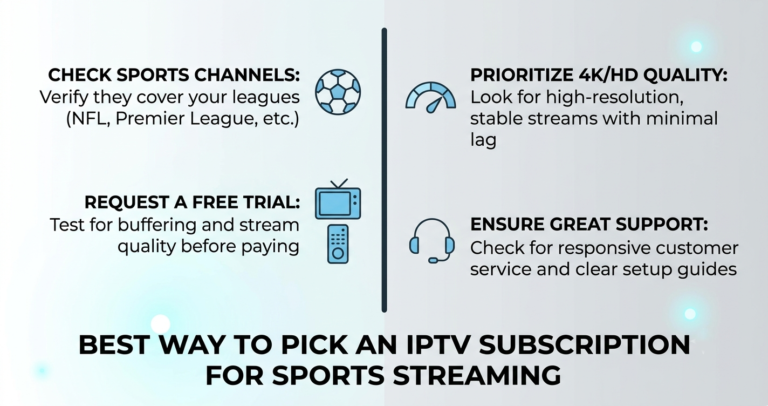
What matters now: a provider with genuine multi-source redundancy, infrastructure diversification so a single takedown doesn’t blank you, and — for commercial venues — a clear answer on broadcast rights. Ask a prospective provider directly how they handle a source failure during peak load. If the answer is vague, that’s your answer.
For venues weighing options, it’s worth comparing a few established commercial suppliers and reseller-managed services side by side before committing; resources like britishreseller.com lay out how UK IPTV reseller panel models and credit systems work, which helps frame the right questions to ask any provider.
Frequently asked questions
Is Sports Bar IPTV legal to show in a commercial venue?
It depends on the rights. Showing live sport publicly almost always requires a commercial broadcast agreement tied to the rights holder, separate from any home subscription. A consumer Sports Bar IPTV service usually doesn’t carry those rights, which is where the legal risk sits. Always confirm commercial licensing for your country and league before broadcasting.
Why does my Sports Bar IPTV buffer only during big matches?
Because peak concurrency overwhelms under-built infrastructure. On quiet nights the load is light; during a marquee fixture, huge numbers of streams hit the same source at once. If your provider lacks load balancing and backup feeds, the system saturates exactly when you need it most. The fault is usually upstream, not your venue’s Wi-Fi.
Should a sports bar use Wi-Fi or wired connections for screens?
Wired, always, for primary playback. Wi-Fi struggles when several live feeds run at once and introduces drops that wreck a busy night. Reserve wireless for staff devices or a single backup screen, and put every main screen on a dedicated, segmented Ethernet line separate from payment and guest traffic.
Can an IPTV reseller supply a sports bar reliably?
Yes, and many do. A capable IPTV reseller manages the panel, handles credits and renewals, and answers fast when a feed drops. For commercial clients, responsiveness during fixtures matters more than price. The reseller panel model works for venues when the panel owner builds in failover and is reachable during match hours.
What should I check before a big match night?
Confirm every screen thirty minutes before kickoff, run a wired speed test on the streaming line, and verify your backup source is live. Most match-night failures surface in that pre-game window and go uncaught when nobody looks. A short pre-match ritual prevents the majority of in-game disasters.
How do I stop ISP throttling from killing my stream?
Throttling happens at the network level, so app changes won’t fix it. Switching DNS (Cloudflare is a common first step) often restores access, and adding a VPN layer on the venue’s line can defeat weekend traffic shaping. If a provider’s feed dies only at peak times across ISPs, suspect throttling rather than the service itself.
Is cheaper Sports Bar IPTV ever worth the risk?
Rarely, for a licensed venue. The low price usually reflects missing commercial rights and missing redundancy — the two things that cost you most when they fail. One frozen final or one enforcement letter erases years of savings. For a commercial setting, reliability and proper licensing are the value, not the monthly fee.
Action checklists
For venue owners (subscribers)
- Confirm commercial broadcast rights for your country and league before showing any sport
- Wire every primary screen via Ethernet; never run live feeds on Wi-Fi
- Segment your streaming line from payment and guest networks
- Run a live-match stress test before committing to any provider
- Set a 30-minute pre-kickoff check as a non-negotiable routine
- Keep one fallback screen on a separate connection and service
For IPTV resellers
- Build support availability around fixture calendars, not office hours
- Confirm genuine failover exists before promising venues reliability
- Allocate panel credits with headroom for multi-screen commercial use
- Track which accounts are commercial and prioritise their match-night support
- Maintain credits across two providers so one disappearance doesn’t sink clients
For sub-resellers
- Don’t take on a venue account until you’ve tested delivery under live peak load
- Be transparent with the panel owner about commercial vs home usage
- Have a named contact for escalation when a feed fails mid-match
- Learn DNS and VPN basics before an ISP throttling weekend forces you to
The bottom line
Sports Bar IPTV lives or dies on two things most operators underestimate: surviving the concurrency of a big match, and standing on the right side of commercial licensing. The cheap setup that looks identical on a quiet Tuesday is the one that freezes during the final and the one missing the rights that keep you safe. Build for the worst ten minutes of your busiest night, not the calm of the test run.
If there’s one lesson worth keeping, it’s this: in this business, reliability is the product. A venue doesn’t remember the months everything worked — it remembers the night the screen went black with a full house watching. Engineer for that night, and the rest takes care of itself.