What Saturday at 3PM Really Looks Like Behind the Screen
Picture this: 67,000 concurrent streams hammering a panel that comfortably handled 40,000 the week before. A Champions League night. Two English clubs. And somewhere in Manchester, a customer is refreshing his Firestick for the fourth time while the goal he paid to watch happens without him.
That moment — not the marketing, not the channel count — is the entire story of IPTV for football fans 2026. Everything that matters happens in the ninety seconds around kickoff, and most services were never built to survive it.
I’ve spent the better part of a decade watching this exact scenario play out. So instead of another listicle about “the best apps,” let me walk you through what genuinely separates a service that holds up from one that collapses when it counts.
The Myth of the Channel Count
New buyers obsess over numbers. “20,000 channels!” “Every league on Earth!” Here’s what a decade in the trenches taught me: nobody watching IPTV for football fans 2026 cares about 20,000 channels. They care about one channel working flawlessly for 110 minutes on a specific Tuesday night.
The channel count is a vanity metric. A service can list every Premier League fixture and still buckle the instant demand spikes. What you’re actually buying is headroom — the spare server capacity that sits idle 90% of the week and earns its keep only during peak load.
A mistake we repeatedly see: UK IPTV resellers benchmark their infrastructure against a quiet weekday and assume that’s the ceiling. Then a North London derby arrives and the whole thing groans.
Pro Tip: Before committing to any provider, ask them a single question — “What’s your concurrent stream ceiling per server, and how do you load-balance during a Champions League double-header?” If they can’t answer specifically, they’ve never been tested. Walk away.
Why Match Day Is an Engineering Problem, Not a Content Problem
Football traffic isn’t steady. It’s a vertical spike. Understanding this shape is the difference between a stable IPTV for football fans 2026 setup and a frustrating one.
Here’s the load pattern that defines the entire business:
| Time Window | Relative Load | What’s Happening |
|---|---|---|
| Pre-match (T-15 min) | 40% | Fans tuning in early, EPG checks |
| Kickoff (T-0) | 100% | Everyone connects within 90 seconds |
| Half-time | 65% | Brief dip, second-screen activity |
| Second half | 95% | Sustained near-peak |
| Final whistle | 30% | Rapid drop-off |
That kickoff column is where services die. Sixty percent of your entire match-night audience can hit a single stream inside a minute and a half. If the load balancer doesn’t redistribute that surge across backup uplinks instantly, buffering cascades — and once a stream stutters during a goal, that customer is mentally drafting a refund request.
During a major sports event last season, we watched a competitor’s panel flatline three minutes before kickoff. Their servers were fine. Their routing wasn’t.
The ISP Problem Nobody Warns You About
This is the part of IPTV for football fans 2026 that surprises even experienced users. Your stream can be perfect at the source and still fail in your living room — because your ISP is interfering.
UK ISPs have grown noticeably more aggressive with deep packet inspection during high-profile fixtures. We noticed unusual ISP behaviour clustering around weekend afternoons: throttling that mysteriously vanishes by Monday morning. It’s not paranoia; it’s pattern recognition across thousands of connection logs.
Here’s how the interference typically shows up:
- DNS poisoning — your device asks for the stream’s address and gets a wrong or dead one back, so it can’t even find the server.
- Throttling — the connection isn’t blocked, just slowed to the point where HD becomes a slideshow.
- SNI-based blocking — the ISP reads which server you’re contacting and quietly drops the request.
The fix isn’t magic. It’s a quality DNS configuration, a reliable connection-protection layer, and a provider that rotates its routing intelligently. Cheap services skip all three because each one costs money.
Pro Tip: If your stream is flawless on mobile data but stutters on home broadband during matches, your ISP is the culprit — not your provider. Test this once and you’ll never blame the wrong party again.
The Hidden Cost of Cheap Infrastructure
Let me be blunt about pricing, because this is where customers and new resellers both get burned.
A £20-per-year service and a £20-per-month service are not selling the same thing. The cheap one has overcommitted its servers by a factor of ten, betting that most subscribers won’t all watch at once. That bet works on a Wednesday afternoon. It catastrophically fails on a Saturday at 3PM.
One reseller lost nearly a third of his customer base in a single weekend because his upstream provider couldn’t handle a packed fixture list. He’d chosen the cheapest credits available. The math looked brilliant until the churn arrived.
Here’s the real cost breakdown buyers never see:
| What You Pay For | Cheap Service | Stable Service |
|---|---|---|
| Server headroom | Minimal | 40%+ spare capacity |
| Backup uplinks | Often none | Multiple, auto-failover |
| Load balancing | Static | Dynamic, geo-aware |
| Match-day monitoring | Reactive | Live, staffed |
The stable service costs more because it’s idle most of the week on purpose. You’re paying for the empty seats that exist only so they’re there when the stadium fills.
What Buffering Actually Means
When people complain about buffering with IPTV for football fans 2026, they think it’s one problem. It’s at least four.
Buffering during a goal is rarely a single fault. After reviewing hundreds of support requests, the pattern is consistent — it’s a chain reaction:
- Source overload — too many streams on one server node.
- HLS latency — the streaming protocol chops video into chunks; under load, chunks arrive late.
- Uplink saturation — the pipe out of the data center is full.
- Last-mile ISP throttling — the slowdown happens in the final stretch to your home.
A genuinely good service for IPTV for football fans 2026 attacks all four. It spreads streams across nodes, tunes chunk sizes for lower latency, keeps backup uplinks warm, and helps users route around ISP interference. Miss any one link and the chain breaks at kickoff.
Pro Tip: Lower HLS latency isn’t always better. Ultra-low-latency setups buffer more under heavy load because they have less cushion. The best match-day services run a slightly larger buffer deliberately — a two-second delay you’ll never notice beats a freeze you’ll never forget.
Device Reality for the 2026 Season
Not every device handles IPTV for football fans 2026 the same way, and the gap widens precisely when load peaks.
The cheaper Firestick models throttle their own CPU when they overheat — and a long match in a warm room is exactly when that happens. We’ve traced countless “your service is rubbish” complaints to a device quietly downclocking itself mid-match.
A quick reliability ranking based on years of support data:
- Most stable: Android TV boxes with active cooling, Apple TV 4K.
- Reliable with care: Newer Firestick 4K Max, Nvidia Shield.
- Temperamental under load: Older Firesticks, budget Android boxes, some smart-TV apps.
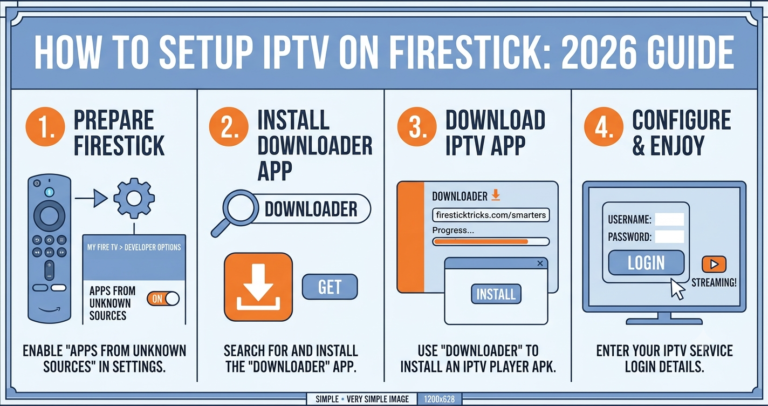
The app matters too. A lightweight player that manages its own buffer aggressively will outperform a flashier one during a packed fixture night.
Choosing a Service That Survives Kickoff
If you’ve read this far, you already know more than 90% of buyers. Here’s how to put it to use.
The reliable corner of the market for IPTV for football fans 2026 is small, and it’s defined by infrastructure honesty rather than channel-count bragging. A provider like britishseller.co.uk earns attention not because of a flashy list but because match-day stability is treated as the core product — which is the only thing that matters when you’ve waited all week for one fixture.
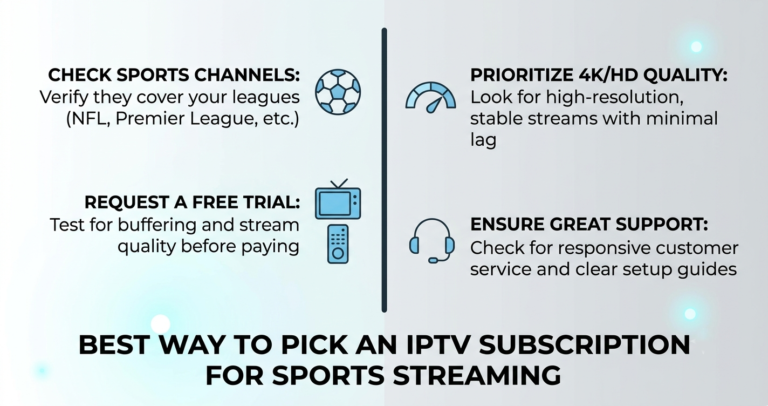
When you’re evaluating any option for IPTV for football fans 2026, judge it on these:
- Does it openly discuss concurrent-stream limits?
- Does it offer a short trial timed during a real match?
- Does it acknowledge ISP interference and offer solutions?
- Is support actually awake at 3PM on a Saturday?
A service confident about its IPTV for football fans 2026 offering will welcome a match-day trial. One that dodges it knows it’ll fail the only test that counts.
What Resellers Get Wrong
If you’re building a business around IPTV for football fans 2026, the operator lessons differ from the subscriber ones.
A mistake we repeatedly see: resellers sell on price, then drown in support tickets every weekend because the underlying infrastructure can’t cope. They’ve effectively sold a product that breaks on schedule.
The resellers who survive treat football season as their stress test, not their payday. They provision extra credits before a big fixture list, warn customers about ISP throttling before it happens, and pick upstream providers based on match-day performance rather than margin. During one migration project, the operators who scheduled their cutover for a quiet weekday — never a match night — were the ones who kept their customers.
Churn for IPTV for football fans 2026 is brutally seasonal. You don’t lose customers gradually. You lose them in clusters, on specific weekends, when a specific match buffers.
Frequently Asked Questions
What makes IPTV for football fans 2026 different from regular IPTV?
The difference is load shape. Football creates vertical traffic spikes at kickoff that regular viewing never does. A service optimized for IPTV for football fans 2026 prioritizes concurrent-stream capacity, dynamic load balancing, and match-day monitoring over raw channel count — because surviving that 90-second surge is the entire challenge.
Why does my stream buffer only during big matches?
Because demand spikes vertically at kickoff. Either the source server is overloaded, the uplink is saturated, or your ISP is throttling high-traffic connections during the fixture. Test the same stream on mobile data — if it’s smooth there, your home ISP is interfering, not your provider.
Is IPTV for football fans 2026 legal in the UK?
The legal landscape is nuanced and enforcement-focused. Streaming copyrighted broadcasts without proper rights carries legal risk for both providers and viewers in the UK. Anyone using these services should understand their local regulations and the legal status of the content they access before subscribing.
How do I stop my ISP from blocking football streams?
A quality DNS configuration and a reliable connection-protection layer handle most UK ISP interference. If a stream works on mobile data but fails on broadband during matches, that confirms ISP throttling. A good provider rotates routing to stay ahead of deep packet inspection during high-profile fixtures.
As a reseller, how do I prepare for a busy fixture weekend?
Provision extra credits ahead of time, never schedule migrations on match days, and choose upstream providers on match-day performance, not margin. Warn customers about ISP throttling before it bites. Treat heavy fixture weekends as your stress test — that’s when churn for IPTV for football fans 2026 concentrates.
Which device is most reliable for watching matches?
Android TV boxes with active cooling and Apple TV 4K top the list. Older Firesticks downclock when they overheat during long matches, causing buffering wrongly blamed on the service. Pair a stable device with a lightweight player that manages its own buffer aggressively for the best match-day results.
Should I trust services advertising massive channel counts?
Be sceptical. Channel count is a vanity metric. A service can list every fixture and still collapse at kickoff. What matters for IPTV for football fans 2026 is spare server headroom and load balancing — the capacity that sits idle most of the week and only proves itself when everyone connects at once.
How can I test a service before committing?
Request a trial and time it during an actual match — ideally a popular fixture. A confident provider welcomes this; a weak one dodges it. Watching a real high-traffic game is the only test that reveals whether the infrastructure holds when it genuinely matters.
Your Match-Day Execution Checklist
For subscribers
Test any new service during a live match before paying for a full year. Keep a backup DNS configuration ready. Use a device with proper cooling. Confirm whether buffering is your ISP or your provider by testing on mobile data. Watch on the lightest player your device supports.
For resellers
Provision spare credits before heavy fixture weekends. Never schedule migrations on match nights. Vet upstream providers on concurrent-stream limits, not price. Warn customers about ISP throttling proactively. Monitor support ticket clusters by weekend to predict churn before it lands.
For sub-resellers
Don’t oversell capacity you don’t control. Ask your upstream IPTV UK reseller their concurrent-stream ceiling in writing. Build a small buffer of spare credits for surge weekends. Communicate honestly about match-day expectations rather than overpromising. Track which fixtures generate complaints and plan around them.
The truth about IPTV for football fans 2026 is that it lives or dies in the ninety seconds around kickoff. Everything else — the channel lists, the slick interfaces, the bargain pricing — is just noise until the stadium fills and the real test begins. Build for that moment, or get exposed by it.