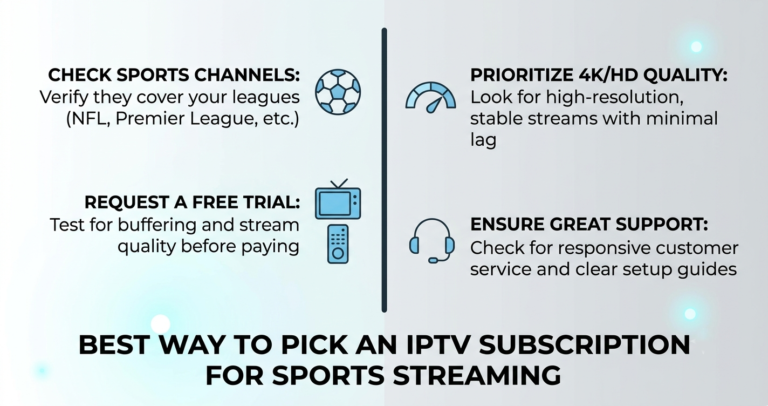
A landlord in Leeds once rang his supplier forty minutes before kick-off. United, big match, full house, forty covers booked for food. The screen had frozen on a buffering wheel. The supplier didn’t answer. He’d built his busiest night of the month around a single feed with no backup, no second provider, and no plan B. The kitchen still had to comp half the tables.
That story isn’t rare. It’s the default outcome when sports IPTV for pubs gets treated as a consumer subscription scaled up, rather than as commercial infrastructure with commercial stakes.
So here’s the short answer before anything else. Sports IPTV for pubs can absolutely work, but only when it’s built for sustained match-day load, run across redundant feeds, and — this is the part most people skip — separated cleanly from the question of licensing. The technology keeping your screen stable and the law governing what you’re allowed to broadcast commercially are two entirely different problems. Confuse them and you’ll lose either the picture or your premises licence. The most important takeaway: never depend on one feed, one provider, or one assumption.
Let me unpack why.
The licensing line nobody wants to hear about
I’ll deal with this first because it’s the part that gets glossed over, and glossing over it is how venues end up in court.
Showing live sport commercially in a pub is not the same as watching it at home. In the UK, Sky and TNT Sports sell dedicated commercial packages through providers like Sky Business, and the cost reflects rateable value, not a flat consumer fee. Across the US, Canada, Australia and Ireland the bodies differ but the principle holds: commercial premises need commercial rights.
A consumer IPTV service — however stable, however cheap — does not grant you those rights. That’s a legal reality independent of stream quality.
Pro Tip: The streaming question and the rights question are separate purchases. Sort your commercial broadcasting rights through the proper channels first, then treat your IPTV setup purely as a delivery and reliability layer. Operators who blur the two are the ones who get caught out — by a rights-holder visit, not a buffering wheel.
I’m not going to pretend every venue navigates this perfectly. But you asked for a field manual, and the field reality is that the cheap-feed-for-a-commercial-room shortcut carries enforcement risk that a frozen screen never will.
What actually breaks on match day
Set licensing aside and look at the engineering, because this is where most setups quietly fail.
A home connection streams one match to one telly. A pub pushes the same feed to four, six, sometimes ten screens during a derby, while the card machine, the kitchen tablet and forty phones fight for the same WiFi. Match day is a load-test you didn’t ask for.
Here’s what we repeatedly see go wrong:
- Single uplink, single feed. One source, no failover. When it drops mid-match, everything drops at once.
- Consumer-grade WiFi handling the whole room. Streaming devices should be wired. Wireless is for customers’ phones, not your screens.
- No second provider on standby. The night the main source dies is the night you wish you’d kept credit with a backup.
- Untested setup. Nobody runs a stress test on a Tuesday. They find the limit at 3pm on Saturday.
| Cheap single-feed setup | Resilient pub setup |
|---|---|
| One provider, one stream | Two providers, ready to switch |
| WiFi to every screen | Wired Ethernet to each screen |
| No monitoring | Someone watching feed health pre-kickoff |
| Discover faults live | Tested before the rush |
| Frozen room, no recovery | Switch sources in under a minute |
During one busy Champions League night a venue we know lost its primary feed at half-time. The screens were back inside ninety seconds — not because the provider was flawless, but because the landlord had a second source pre-loaded and a wired switchover ready. Redundancy isn’t paranoia. It’s the difference between a minor blip and a refunded room.
Why peak traffic is where providers get exposed
Any feed looks fine on a quiet Wednesday. The honest test is a marquee fixture when thousands of venues hit the same servers at once.
This is where infrastructure quality stops being abstract. Load balancing spreads demand across multiple servers so no single one collapses under a spike. Backup uplinks keep data flowing when a primary route fails. Without these, a provider that streams beautifully at 11am can stutter through the exact ninety minutes you’re paying for. The failure is predictable — it just only shows up under pressure.
Pro Tip: Judge any sports feed by how it behaves during a major simultaneous-broadcast event, never a quiet afternoon. Suppliers serving a lot of commercial rooms hit their ceiling precisely when every pub goes live together. If you can, trial across a genuine peak before you commit a single match night to it.
ISP interference and why your feed can wobble even when the source is fine
Sometimes the stream isn’t the problem — the path to it is.
Internet providers increasingly fingerprint and throttle certain traffic, and through 2026 that detection has only grown more aggressive with AI-driven classification. A feed that ran clean for months can suddenly degrade because of changes upstream, nothing to do with your supplier.
First-line fix is usually swapping your DNS — Cloudflare’s resolver is the standard starting point and often restores a wobbling feed in minutes. If routing interference persists, a VPN at the network level can sidestep throttling, though that’s a heavier step for a commercial setup and worth getting configured properly rather than improvised mid-match.
The lesson from the floor: when a feed degrades, don’t assume the provider failed. Check the path first. Half the “outages” we see traced back are routing issues the venue could clear themselves.
The reseller angle — supplying pubs is a different business
A quick detour for anyone on the supply side, because pubs are a distinct and demanding customer for any UK IPTV reseller.
Selling to a single household and selling to a commercial room are not the same trade. A pub is your highest-stakes account: one bad match night and that landlord tells every other landlord in town. For an IPTV reseller or panel owner, commercial customers are where reputation is genuinely made or destroyed.
What separates a serious IPTV reseller panel from a hobbyist:
- Credit held across two providers. Any reseller panel operator serving pubs keeps panel credits with more than one source — provider disappearances happen overnight, and a commercial client cannot wait.
- Real support on match days. The single biggest retention driver for a credit reseller isn’t price. It’s answering the phone at 2:45 on a Saturday.
- Honest capacity talk. A good IPTV operator tells a pub what their feed can and can’t sustain rather than overpromising into a derby.
Pro Tip: If you’re an IPTV reseller chasing pub accounts, price for support, not just for stream access. A panel owner who under-prices commercial clients ends up resenting the support load and cutting corners — and that’s exactly when the IPTV business owner loses the account. Sub-resellers servicing local venues should hold their own backup credits too, never relying solely on the upstream panel.
Reliability sells these accounts. A reseller panel that holds up through peak traffic earns referrals across an entire town’s licensed trade; one that folds on match day burns through the whole network. For background on how commercial-grade UK IPTV reseller infrastructure is structured, britishseller.co.uk covers the panel and reliability side in more depth.
Hardware: the unglamorous half of the setup
People obsess over the feed and ignore the box playing it. Mistake.
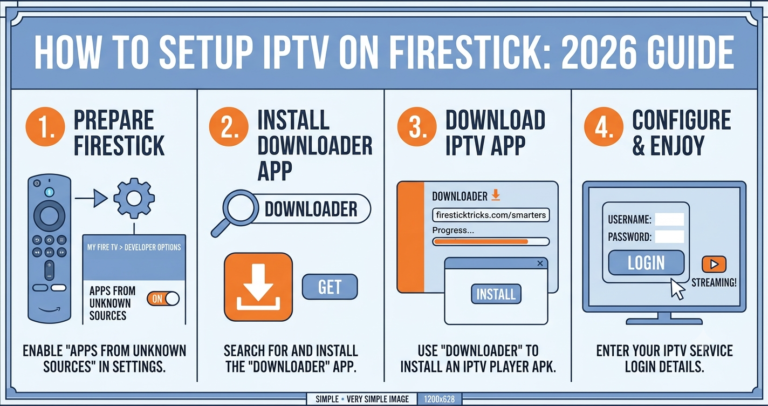
The most difficult devices to keep running reliably in a commercial room tend to be MAG boxes — fiddly to configure, awkward to recover when they hang. Firestick-class devices are the easiest to deploy and reset quickly, which matters when you’ve got minutes before kickoff. Wherever possible, wire the device to the router; WiFi is the first thing to choke when the room fills with phones.
Match-day hardware run-through:
- Wire every screen’s device to the network — no wireless for broadcast.
- Power-cycle and load the feed at least two hours before kickoff.
- Confirm your backup provider loads on at least one screen.
- Note your DNS-swap steps somewhere the duty manager can find them.
- Keep one spare configured device boxed and ready to swap in cold.
The recurring failure here is treating setup as a one-time install. It isn’t. It’s a pre-shift checklist, every single match day.
Frequently Asked Questions
Is sports IPTV for pubs legal to use commercially?
The streaming technology is one thing; commercial broadcast rights are another. Showing live sport in licensed premises requires proper commercial rights from the relevant rights-holders in your country. A consumer-grade service doesn’t grant those rights regardless of quality. Sort your commercial broadcasting rights through proper channels first, then treat sports IPTV for pubs purely as a delivery layer.
Why does sports IPTV for pubs freeze during big matches?
Almost always load and redundancy. Major fixtures hit servers with simultaneous demand from thousands of venues, exposing providers without proper load balancing. Add a pub pushing one feed to many screens over WiFi, plus possible ISP throttling, and you get mid-match freezing. Wired devices, a backup provider, and a feed tested under peak load prevent most of it.
How many screens can one IPTV feed run in a pub?
It depends on your upload-capable connection and the device handling each screen, not the feed alone. The safer architecture gives each screen its own wired streaming device rather than splitting one source across many displays. Test your actual setup under realistic load before a real match night — never assume capacity you haven’t proven.
What’s the first fix when a pub feed starts buffering?
Change your DNS before blaming the provider. Cloudflare’s resolver is the standard first-line fix and clears a surprising share of wobbles in minutes, because the fault is often ISP routing rather than the source. If interference persists, a properly configured network-level VPN can bypass throttling. Check the path before assuming the stream itself failed.
Should an IPTV reseller take on pub accounts?
Yes, but go in prepared. Commercial rooms are demanding — a single bad match night damages your reputation across the local trade. Any IPTV reseller serving pubs should hold panel credits across two providers and offer genuine match-day support. For a reseller panel built on reliability, pub accounts become a strong, referral-driving part of the business.
Does a VPN slow down a pub’s sports feed?
It can add minor overhead, but a properly configured network-level VPN on a solid commercial connection rarely causes visible degradation. The trade-off is usually worth it when ISP throttling is the actual problem. Configure it at the router level ahead of time rather than improvising on match day, and test it under load first.
What backup should a pub keep for match day?
At minimum, a second provider pre-loaded on one screen, a documented DNS-swap procedure, and one spare configured device boxed and ready. Redundancy is cheap relative to a refunded, frozen room. The venues that recover fast from a mid-match drop are the ones that prepared the switchover before kickoff, not the ones improvising during it.
Conclusion
Sports IPTV for pubs lives or dies on two things people consistently underestimate: the licensing line and the load line. Get the commercial rights sorted through proper channels, then build a delivery setup that assumes things will break — because on a derby weekend, eventually they do. The venues that stay live through peak traffic aren’t lucky. They’re the ones running redundant feeds, wired screens, a pre-kickoff checklist, and a DNS fix written down where a panicking duty manager can actually find it.
If you take one habit from this, make it redundancy. Two providers, two paths, one prepared switchover. Whether you run a single room or supply a dozen venues as an IPTV reseller, sports IPTV for pubs rewards the operators who plan for failure and punishes the ones who assume it won’t happen to them.
Subscriber / Venue checklist
- Confirm commercial broadcast rights before showing any live sport
- Wire every screen’s device — no WiFi for broadcast
- Load the feed at least two hours before kickoff
- Keep a second provider pre-loaded on one screen
- Write down your DNS-swap steps for the duty manager
Reseller checklist
- Hold panel credits across two providers at all times
- Price commercial accounts to cover real match-day support
- Stress-test feeds under genuine peak load before selling them
- Answer the phone on match days — it’s your top retention driver
Sub-reseller checklist
- Keep your own backup credits; don’t rely solely on the upstream panel
- Document switchover steps for each venue you service
- Flag capacity limits to clients honestly before big fixtures
- Keep one spare configured device ready to swap in cold
One last thing worth holding onto: in this trade, the feed quality you advertise means nothing next to the recovery speed you can actually deliver. Pubs don’t remember the months it worked — they remember the ninety minutes it didn’t. Build for that night, and everything else takes care of itself.